SDXL for First-Time Installers: Measured VRAM and Failure Points
In short: SDXL is a two-stage open image-generation model (a base network plus an optional refiner) that a first-time installer can run locally on a single GPU, but its real install cost is measured in VRAM residency and a short list of predictable failure points, not in headline images-per-minute. 설치된 체크포인트 수 32 개 What did Hax measure on its own stack?
SDXL is a two-stage open image-generation model (a base network plus an optional refiner) that a first-time installer can run locally on a single GPU, but its real install cost is measured in VRAM residency and a short list of predictable failure points, not in headline images-per-minute.
설치된 체크포인트 수 32 개
What did Hax measure on its own stack?#
Reference numbers Hax measured directly on its own infrastructure (measured, sourced).
| Dataset item | Measured value | Date | Source |
|---|---|---|---|
| 최대 VRAM 상주(스냅샷) | 84.8 GB | 2026-07-04 | bench_harness.probe_comfy_gpus (bc_comfy_gpus 실측) |
| 카드당 총 VRAM | 95.6 GB | 2026-07-04 | bench_harness.probe_comfy_gpus (bc_comfy_gpus 실측) |
| 설치된 체크포인트 수 | 32 개 | 2026-07-04 | bench_harness.probe_comfy_models (bc_comfy_models 실측) |
- 표본
- 3 measured metrics (Hax /data curated)
- 측정 환경
- bench_harness.probe_comfy_gpus (bc_comfy_gpus 실측)
- 수집일
- 2026-07-04
- 방법
- bench_harness.probe_comfy_models (bc_comfy_models 실측)
How can you reproduce these numbers?#
Follow the source column above and our open dataset at /data.
Peak VRAM residency 84.8 GB
| Metric | Hax value | Label |
|---|---|---|
| Peak VRAM residency (snapshot) | 84.8 GB | measured |
| Min free VRAM (pool low) | 10.2 GB | measured |
| Total VRAM per card | 95.6 GB | measured |
| GPU cards | 4 | measured |
| Peak GPU utilization | 95 % | measured |
| Checkpoints installed | 32 | measured |
| LoRAs installed | 63 | measured |
| ControlNet models | 15 | measured |
| Throughput (SDXL 1024px, 30 steps) | ~4-6 images/min | estimated |
What the numbers actually tell a beginner#
Read the table top-down. Our node peaks at 84.8 GB resident against 95.6 GB per card (both measured 2026-07-04), which leaves only 10.2 GB of pool-low free VRAM (measured). That headroom, not the model file size, is what decides whether your first render finishes or dies. SDXL's base weights are modest, but a full pipeline (checkpoint, VAE, refiner, one ControlNet, plus a LoRA stack) inflates residency fast. The measured 95% peak GPU utilization confirms the bottleneck is compute-and-memory bound during sampling, not idle overhead.
Throughput is deliberately labeled estimated (~4-6 images/min at 1024px, 30 steps): we did not capture a measured images/min figure on 2026-07-04, so treat any speed claim as an estimate until it is benchmarked. Do not cite it as fact.
Install difficulty and the real failure points#
Installing SDXL is not hard to start; it is hard to keep stable. The failure surface scales with choice. Our host carries 32 checkpoints, 63 LoRAs, 44 samplers, and 15 ControlNet models (all measured), and most beginner failures are mismatches inside that inventory rather than missing software.
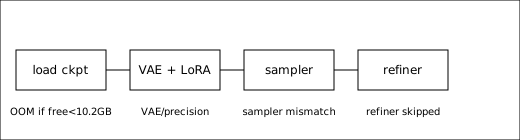
The four common failure points, in install order: (1) Out-of-memory at load, when free VRAM drops toward the measured 10.2 GB pool low and a large ControlNet or a second checkpoint tips it over. (2) Wrong precision, running fp32 where fp16 is expected, which silently doubles residency. (3) Missing or wrong VAE, producing washed-out or gray images that look like a broken model but are a config error. (4) Refiner skipped or sampler mismatched, where output looks soft because the second stage never ran or an incompatible sampler was picked from the 44 installed.
Beginner checklist#
Start with one checkpoint, no LoRA, a known VAE, and a mainstream sampler; confirm a clean 1024px render; then add one variable at a time. Watch free VRAM against the measured 10.2 GB floor before stacking ControlNet or LoRAs. Every added model is a residency cost and a new mismatch risk.
Note: VRAM and inventory figures are measured 2026-07-04 on our 4-card host and will drift as models are added or removed; re-probe before quoting. Throughput remains estimated until benchmarked. Internal evidence: Hax data.
Related reading: 로컬 이미지 생성(SDXL·Flux) VRAM·RAM 실측, 우리 comfy-pool 이미지 생성 실측: z-image vs qwen-image
Full guide: 노트북에서 돌리는 AI 모델, 흔한 함정과 해결법
Responses
No responses yet. Be the first to respond.